
There are hundreds of video editing programs on the market — and choosing the right one is genuinely difficult. Professionals swear by some, bloggers love others, and some of the best options are completely free. Whether you are just starting out or ready to go professional, this guide breaks down the 8 best video editing programs available in 2026, covering features, pricing, skill level requirements, and who each tool is best suited for.
Table of Contents
How We Chose These 8 Video Editing Programs
Every program on this list was evaluated against the same criteria: ease of use, feature set relative to price, cross-platform support, active development, and real-world performance for common editing workflows including YouTube content, short-form social video, and professional film editing. Free tools were held to the same standard as paid ones — if a free editor performs at a professional level, it earns its place on this list.
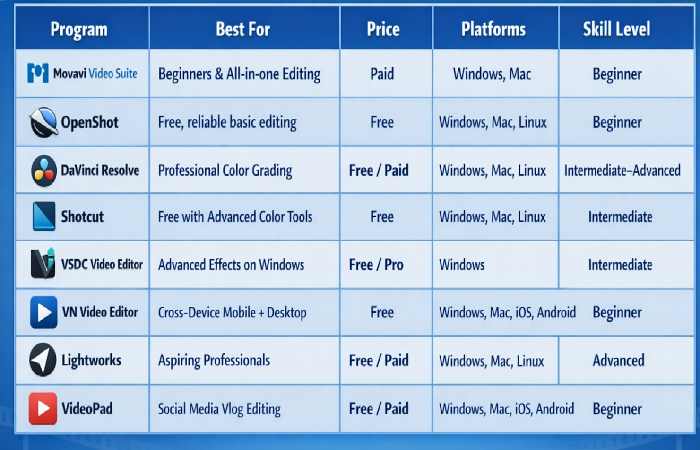
Quick Comparison: 8 Video Editing Programs at a Glance
Use the table below to quickly identify which program fits your skill level, budget, and platform before diving into the detailed reviews.
| Software | Price | Best For | Platform | Skill Level | Rating |
| Movavi Video Suite | Paid (Free Trial) | Beginners & casual creators | Win / Mac | Beginner | 4.3/5 |
| OpenShot | Free | Amateur filmmakers & bloggers | Win / Mac / Linux | Beginner | 4.1/5 |
| DaVinci Resolve | Free / $295 Studio | Professional color grading | Win / Mac / Linux | Advanced | 4.8/5 |
| Shotcut | Free | Color correction enthusiasts | Win / Mac / Linux | Intermediate | 4.2/5 |
| VSDC Video Editor | Free / Paid Pro | Advanced effects on a budget | Windows | Intermediate | 4.0/5 |
| VN Video Editor | Free | Mobile + desktop editing | Win / Mac / iOS / Android | Beginner | 4.4/5 |
| Lightworks | Free / $23.99/mo | Aspiring professionals | Win / Mac / Linux | Advanced | 4.1/5 |
| VideoPad | Free / Paid | Bloggers & social media | Win / Mac / iOS / Android | Beginner | 3.9/5 |
1. Movavi Video Suite — Best Video Editing Program for Beginners
Price: Paid (Free Trial Available)
Platforms: Windows, Mac
Skill Level: Beginner
Movavi Video Suite is another easy to use video editing software and it is worth using by beginners. It provides a simple user interface and drag-and-drop features, useful presets, and in-built effects, thus allowing you to cut, join and edit your videos without having to be a skilled user. It also has screen recording, media file conversion, and slideshow creation capabilities as well as editing features, making it a one-stop solution (all in one) to easily made video projects.
2. OpenShot — Best Free Open-Source Video Editor
Price: Free (Open Source)
Platforms: Windows, Mac, Linux
Skill Level: Beginner
OpenShot is a free and open-source video editor, suitable to a beginner who desires to use some powerful tools but at no cost. It has multi-track timelines, keyframe effects, audio mixing and even 3D animated effects which makes it remarkably good considering it is a free program. It might not be as polished as paid software, but it is reliable, it is regularly updated, and it is compatible with Windows, Mac, and Linux and is therefore a great option among hobbyists and novice content creators.
3. DaVinci Resolve — Best for Professional Color Grading
Price: Free / Studio version $295 one-time
Platforms: Windows, Mac, Linux
Skill Level: Intermediate to Advanced
DaVinci Resolve is an advanced video editing program that is associated with the color grading features that are industry leading. It was firstly utilized in Hollywood to correct the color but it has gained a full editing suite with professional applications such as advanced audio editing, motion graphic, and collaborative tools. Although the free version is highly powerful, it may seem to be complicated to use by a novice user. It is optimal with average and expert users that can achieve professional-level results without having to pay a subscription fee.
4. Shotcut — Best Free Editor for Advanced Color Correction
Price: Free (Open Source)
Platforms: Windows, Mac, Linux
Skill Level: Intermediate