


Software Testing is the process of evaluating and verifying that a software application or system meets specified requirements and works correctly without defects before it’s released to users. It ensures quality, reliability, and user satisfaction by identifying bugs and faults early The primary benefits of robust testing include delivering high-quality software by identifying bugs and improving performance.
Table of Contents
Types of Software Testing
Here are the Types of Software Testing mainly categorized into the two domain, which are below.
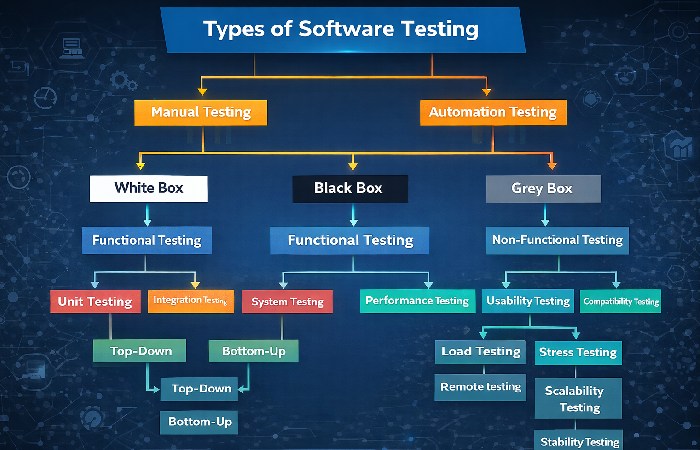
| Type | Purpose |
| Unit Testing | Tests individual components of code |
| Integration Testing | Tests connection between modules |
| System Testing | Tests complete system |
| Acceptance Testing | Tests whether it meets user needs |
| Regression Testing | Retests after changes to ensure no new bugs |
| Performance Testing | Checks how software performs under stress |
| Security Testing | Checks for security vulnerabilities |
| Usability Testing | Ensures software is easy to use |
Software Testing Tools
Here’s a table of widely-used tools with their main use:
| Tool | Main Use | Type |
| Selenium | Web automation testing | Automation/Functional |
| Apache JMeter | Load & performance testing | Performance |
| Postman | API testing | API |
| Appium | Mobile app testing | Automation |
| TestRail | Test case management | Management |
| SoapUI | Web services/API testing | API |
| FitNesse | Acceptance & integration testing | Automation |
| TestProject | Web & mobile testing | Automation |
Software Testing Jobs
Here are common jobs in the software testing field:
| Job Role | Typical Responsibilities |
| QA Analyst / QA Engineer | Plans and executes tests, reports bugs |
| Manual Tester | Tests software manually without automation |
| Automation Tester | Writes scripts using tools like Selenium |
| SDET (Software Dev Engineer in Test) | Writes code and builds test frameworks |
| Performance Tester | Tests software performance under load |
| Security Tester | Checks application security and vulnerabilities |
| Mobile App Tester | Tests Android/iOS apps for bugs |
How to Perform Software Testing – Step by Step
Understand Requirements
Read and understand the system requirements and what the software must do before testing starts.
Plan the Testing
Write a test plan that includes scope, goals, types of tests, environment setup, and schedule.
Design Test Cases
Create detailed test cases with input values, expected results, and steps to follow.
Prepare Test Data
Generate test data that mimics real-world scenarios to test different conditions.
Set Up Testing Environment
Configure devices, browsers, servers, and tools needed for executing the tests.
Execute Test Cases
Run the tests manually or with tools, and record the results.
Log and Track Defects
Report issues found (with steps to reproduce) in a defect tracking tool (like JIRA).
Retest and Regression Testing
After fixing bugs, retest and also run regression tests to make sure fixes didn’t break anything else.
Test Report & Review
Prepare and share a test summary report showing what was tested, bugs found, and quality status.
Software Testing Online Courses
Here’s a comparison of popular online learning options:
| Platform / Course | Focus | Level |
| Coursera – Software Testing Foundations | Basics to advanced tools | Beginner-Intermediate |
| Udemy – Software Testing Courses | Manual & automation tools | All levels |
| ISTQB Certified Tester (CTFL) | Official QA certification | Intermediate |
| ClassCentral collection | Many courses from multiple sources | Varies |
| Edureka / Great Learning | Full test lifecycle + projects | Intermediate |
Software Testing Courses – Worldwide Fees (Approx.)
| Course / Provider | Fees (Approx.) | Duration / Level |
| Online Accredited Certification (ASTC) | $49–$69 | Short certification, lifetime valid (International Software Test Institute) |
| Udemy Software Testing Courses | $30 – $150 | Short online (various topics) (TechRepublic) |
| Coursera Software Testing Training + Certification | $995 + $50 cert fee | Full professional online program (Coursera) |
| Simplilearn AI-Powered Automation Test Engineer | $1,499 | 6-month professional online course (Simplilearn.com) |
| International ISTQB® Foundation Training | £165+ taxes (exam fee) | Certified tester course fee list (bcs.org) |
| Besant Technologies Software Testing | ₹35,000 – ₹50,000 | Online training with tools & projects (Besant Technologies) |
| StarAgile Software Testing | ₹49,999 – ₹119,999 | Professional QA + automation training (StarAgile) |
| QXP Solutions (Online) | ₹17,000 – ₹28,000+ | Live & full stack testing training (qxpsols.com) |
| Basic Online Courses (edX / Coursera Free & Paid) | Free – ₹20,000+ | Short modules (beginner to intermediate) (Collegedunia) |
| Vatedigi Software Testing Package | ₹14,700 – ₹51,250 | Manual to advanced testing bundle (vatedigi.com) |
How To Pay Software Testing Course Fee

Credit or Debit Card
You can make payments using major card types like:
- Visa
- MasterCard
- American Express
This works for most online training platforms and institutes.
PayPal
A secure global payment method — you can pay using your PayPal balance, or link your bank/debit card to PayPal.
UPI / Digital Wallets
In some countries (like India), many training providers accept:
- UPI
- Google Pay
- PhonePe
- Paytm
This makes paying easy from your phone.
Bank Transfer / Net-Banking
You can transfer the course fee directly from your bank account to the institute’s account using:
- Net-Banking
- RTGS / NEFT
Many institutes give you bank details after registration.
Installments / EMI
Some providers let you pay in monthly instalments (sometimes at zero interest) rather than all at once.
Offline Payment
If the training is in a local institute, you might pay by:
- Cash
- Cheque
- Payment at the institute reception
Receipts are issued when the payment is made.
Payment After Employer Sponsorship
If your company is paying, you might fill in company details and they pay via invoice or company transfer.
Examples of Application Software
Application software helps users do specific tasks (not system functions). Examples:
| Type | Examples |
| Word Processing | Microsoft Word |
| Web Browsers | Google Chrome |
| Media Players | VLC Media Player |
| Communication | |
| Spreadsheet | Microsoft Excel |
Conclusion
Software testing is a crucial part of building high-quality software. It ensures that applications are reliable, secure, and meet user expectations. A career in testing offers many roles with tools and online learning paths to help you grow. Consistent practice, tool knowledge, and understanding testing types are key to success.
FAQs
Q1. Why is software testing important?
A: It finds bugs before users encounter them and ensures quality and reliability.
Q2. Do I need coding skills for testing?
A: For manual testing, coding isn’t necessary. For automation testing, some programming skills (like Java, Python) help.
Q3. Is software testing a good career?
A: Yes, it’s in demand with many roles in manual and automation testing.
Q4. How long does it take to learn software testing?
A: Basic skills can take a few weeks with online courses, deeper expertise takes months.
Q5. Are testing tools required for every project?
A: Not always, but tools are highly helpful for automation, performance, and API testing
